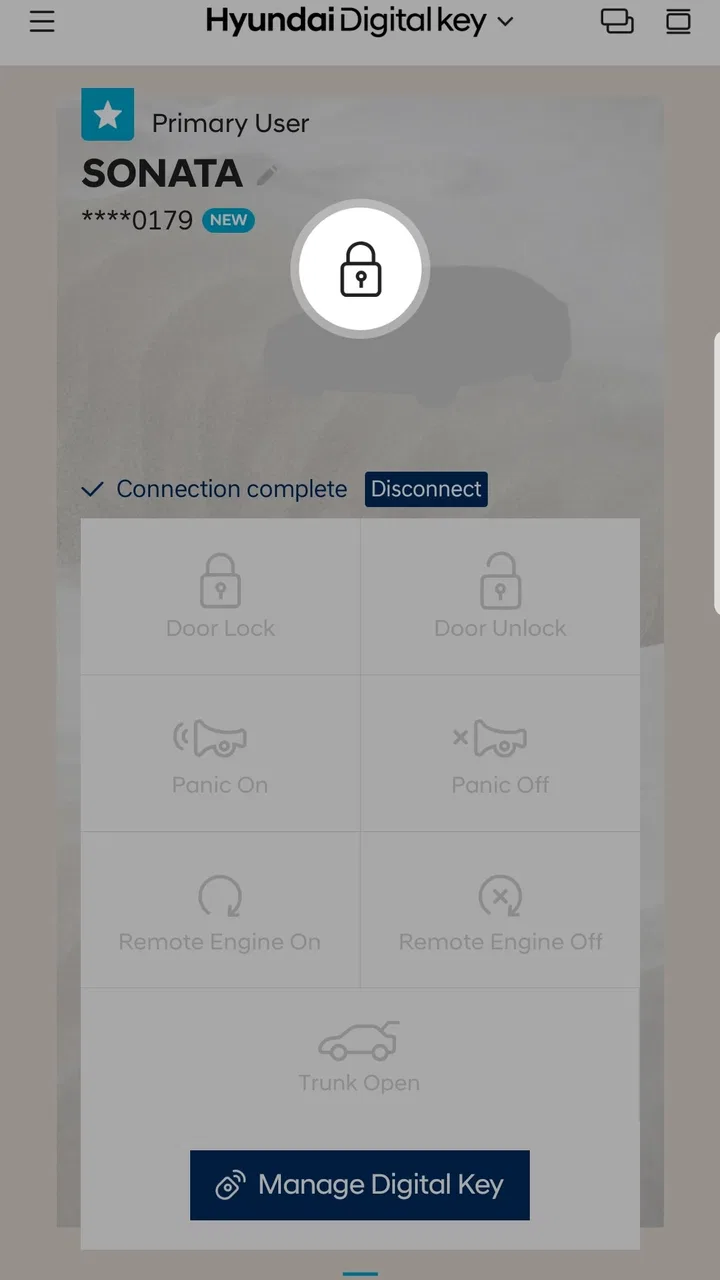
Hyundai Digital Key
- 3.7
- Rating
- 100.00K
- Installs
- Free
- Price

 Analysis by App-foxy
Getting into a Hyundai with your phone instead of reaching for a separate key sounds simple, but the experience depends heavily on whether your vehicle and Android device work with the system. Hyundai Digital Key is a free Auto & Vehicles app from Hyundai Motor America, designed to let owners use a compatible Android device with a compatible Hyundai vehicle. I found it most useful when I treated it as a practical access tool rather than a replacement for every part of the normal ownership experience.
The first thing to understand is that this is not a general remote-control app for any car. Its purpose is narrower and more focused: it connects a supported Android phone with a supported Hyundai vehicle so the phone can function as a digital key. That distinction matters. If your vehicle is not eligible, or your phone does not meet the compatibility requirements, installing the app alone will not turn it into a key.
For a first-time user, that may sound restrictive, but it is actually helpful because it sets the right expectation. You are not downloading a universal car companion with a long menu of unrelated tools. You are setting up a phone-based way to access and use a compatible Hyundai. In my experience, that focused approach makes sense for people who regularly drive one of the supported vehicles and want fewer physical items to carry.
You May Also Like

 Google Keep - Notes and lists
Google Keep’s Quiet Growth Shows the Appeal of Simpler Notes
As mobile work gets busier, Google Keep keeps winning a simple contest: capture a thought quickly, find it later, and get on with the day.

 Blood Strike: 2.5 Anniversary
Blood Strike’s Loadouts Turn Every Drop Into a Tactical Gamble
A close look at Blood Strike’s custom loadouts: how fast access to signature weapons reshapes its battle royale rhythm, rewards preparation, and narrows the gap between fights.

 Pandora - Music & Podcasts
Pandora’s Music Is Easy to Start, but Harder to Recover
Pandora’s strength is its low-effort path from a seed to a station. Its weak spot is how much confidence it asks you to place in connection, setup, and quiet recovery.

 8 Ball Pool
 Is Built on Rivalries, Rematches, and Routine
A close look at the rivalries, rematches, shared routines, and unanswered safety questions that turn a quick pool match into a persistent mobile community.

 Samsung Music
’s Quiet Strength Is Playing What You Already Own
Its reach comes less from spectacle than from dependable access to a personal library. That simplicity is both the app’s strongest retention engine and its ceiling.

 AccuWeather: Weather Radar
AccuWeather Review: A Quick, Clear Forecast for Everyday Decisions
For everyday plans, the best forecast is the one you can understand quickly. AccuWeather makes rain timing, radar, and local conditions easy to act on, with a few trade-offs.
More From Our News Desk



What the app feels like before you rely on it
The app has a 4.2 average from around 4.7 thousand ratings, with over 700 written reviews and more than 100 thousand installs. Those figures suggest that it has found a real audience, but they should not be read as a guarantee that every Hyundai owner will have the same experience. Digital-key apps are unusually dependent on the exact vehicle, phone, setup state, and phone settings involved.
Hyundai Digital Key is free and rated for Everyone, which makes it easy to try without adding a subscription decision to the process. The developer is Hyundai Motor America, so the app feels more closely tied to the vehicle ecosystem than a generic third-party key utility would. It was released on October 31, 2019, and the current version is 1.0.30.4, with Android 7.0 or later listed as the minimum operating system.
That Android requirement is only the starting point. A phone can run the app and still not be the right phone for the digital-key function. Before spending time on setup, I would check the vehicle documentation and the app’s own compatibility path. This is the most important practical step because it prevents a frustrating situation where the app installs normally but cannot complete the connection you actually want.
I would also keep the physical key available during the first few trips. A digital key is most valuable after it has been tested in the situations that matter to you: approaching the vehicle, gaining access, and getting ready to drive. Until those steps work consistently, the phone should be treated as a convenient backup or experiment rather than your only way into the car.
Who benefits most from this approach
I think the app suits drivers who already keep their phone with them and dislike carrying another object. It can also be useful when you are moving between bags, commuting with minimal items, or lending the vehicle to someone who is more comfortable using a phone than managing a traditional key. The benefit is not flashy; it is the small reduction in daily friction.
It is less attractive for someone who wants a broad remote-management suite, detailed vehicle information, or a single app that handles every connected-car function. Hyundai Digital Key should be judged as a digital access tool. If your main interest is checking vehicle status or performing a wider range of connected services, you may be looking for a different Hyundai application or a different part of the ownership system.
Starting setup without making the process harder
After installation, I would begin with the basics rather than immediately trying to use the phone at the vehicle. Confirm that you are signed in where required, keep the phone’s operating system reasonably current, and make sure the phone is the device you intend to use every day. Switching phones halfway through setup can create unnecessary confusion, especially when you are still learning which part of the process belongs to the app and which part belongs to the vehicle.
Have the vehicle nearby and keep its normal key accessible. The setup is not something I would start while rushing to work or standing in a parking lot with a low battery. A calm first attempt gives you time to read each instruction, respond to any vehicle prompts, and notice whether the phone is actually communicating with the car rather than merely opening the app successfully.
The most useful mindset is to separate app installation, vehicle pairing, and everyday use into three different stages. Seeing the app on your phone only confirms the first stage. Pairing is the meaningful setup step. Everyday use comes later, after the vehicle recognizes the phone and you have tested the result outside the setup screen.
During setup, read the wording carefully instead of tapping through automatically. A digital key may involve actions on both the phone and the vehicle, and the order can matter. If the app asks you to move to the car, do that before trying random settings. If it directs you to use the vehicle’s controls, complete that instruction before returning to the phone. Guessing the sequence is one of the easiest ways to mistake a normal pause for a failure.
A practical preparation routine
Check that your Android phone meets the listed minimum system requirement.
Confirm that both the phone and the Hyundai vehicle are compatible with the digital-key function.
Keep the physical key with you until access and starting have been tested successfully.
Begin setup while parked and not under time pressure.
Keep the phone charged enough to complete pairing and a short real-world test.
That routine may seem obvious, but it addresses the problems that are most damaging to a first attempt. It also gives you a clear answer if something goes wrong. Instead of wondering whether the app is broken, you can check compatibility, phone readiness, vehicle readiness, and the exact instruction where the process stopped.
One trade-off is that the app’s usefulness is tied to the phone. A physical key does not depend on the phone being charged, unlocked, updated, or behaving normally. With a digital key, your phone becomes part of the access chain, so battery management becomes a small but real ownership habit. I would not remove the physical key from my normal backup plan simply because the phone worked once.
The first meaningful success is a real vehicle test
The first successful action should not be merely reaching a completed setup screen. The useful milestone is confirming that the phone can perform the access function with the vehicle. Once pairing appears complete, close the setup mindset and test the phone as you would on an ordinary day. Approach the vehicle with the phone in the place you normally carry it, then check whether the expected access behavior occurs.
After access works, continue only as far as you can do safely and according to the vehicle’s instructions. The point is to verify the complete path you expect to use, not to experiment while distracted. If your goal is to leave the physical key at home, you need confidence that the phone-based method works before you make that decision.
I recommend repeating the test after putting the phone away in its usual pocket or bag. A setup that succeeds only when the phone is held in a particular position may not feel dependable in daily life. This is one of the less obvious advantages of testing early: you learn whether the convenience survives normal handling, rather than judging it from a carefully staged setup moment.
A realistic example is a quick grocery stop after work. You leave the office carrying your phone, wallet, and shopping bag, with no desire to manage a separate key. If the phone-based access works as expected, the app has delivered its main value before you have even started thinking about it. The experience is good precisely because it disappears into the routine.
Another useful scenario is sharing access within a household, but I would approach that carefully. Do not assume that installing the app on another person’s phone automatically gives that person useful access. The other phone and the vehicle still need to support the relevant process, and any sharing or authorization steps should be followed exactly as presented by the app and vehicle. The important lesson is that a digital key is an arranged relationship between a particular phone and a particular car, not a loose account feature that works everywhere.
How to judge reliability before depending on it
Test the app on more than one ordinary outing. Try it when you are carrying the phone normally, when the screen is not being actively used, and after the phone has been sitting idle. You are not trying to create unusual conditions; you are checking the conditions your daily routine already creates.
If access does not work, avoid repeatedly tapping buttons without reading the response. First check whether the phone is compatible, whether the vehicle is eligible, and whether the pairing process actually finished. Then inspect the phone’s relevant wireless and system settings without changing several unrelated options at once. Changing everything simultaneously makes it difficult to know what solved the problem, if anything.
For safety, I would never troubleshoot while driving or in a place where you need to move the car immediately. Park first, keep the physical key available, and treat the app as a convenience that must earn your trust through testing. The benefit of a phone-based key is not worth creating a stressful access situation.
Confusing moments and sensible ways to handle them
The most common misunderstanding is expecting the app to work simply because the phone can download it. Compatibility is the central condition, and it includes more than the Android version. The vehicle’s equipment and the phone’s supported capabilities both matter. If the app opens but the vehicle cannot be paired, that does not necessarily mean the installation failed.
Another source of confusion is assuming that the app replaces the vehicle’s entire key experience. Hyundai Digital Key is about using a compatible Android device with a compatible Hyundai vehicle. It should not automatically be treated as a substitute for every physical-key function, every connected service, or every emergency procedure. I would keep the normal vehicle documentation close during initial setup and follow the instructions for the specific vehicle rather than relying on assumptions from another model.
Phone changes can also complicate things. If you upgrade, reset, or replace the device, plan to review the digital-key arrangement instead of expecting it to transfer exactly like a normal app login. A new phone may be compatible in general but still require its own setup. This is a strong reason to complete the first pairing carefully and remember the steps that worked for you.
Battery anxiety is another legitimate limitation. A physical key is passive; a phone-based key depends on an electronic device that can run out of power or become unavailable. I would keep the phone charged before a long day, avoid making the digital key my only plan during travel, and carry the physical key when the consequences of being locked out would be serious.
There is also a difference between convenience and universal speed. When everything is ready, using the phone can feel effortless. When the phone, vehicle, or setup state is not ready, the same system can feel more complicated than taking out a physical key. That trade-off is not a defect unique to this app, but it is important when deciding whether the feature fits your habits.
When another option makes more sense
If you want the simplest possible access method with the fewest technical dependencies, the physical key remains the better choice. It is especially sensible for drivers who dislike phone troubleshooting, frequently let their phone battery run low, or share a vehicle with people who do not want to configure their own devices.
If your priority is broader connected-car management rather than digital access, compare Hyundai Digital Key with the other official tools available for your vehicle and region. A conventional vehicle companion app may be a better match for someone focused on status, service, or remote functions. I would not choose this app expecting it to become a complete ownership dashboard.
For Android users with a supported Hyundai, however, a phone-based key can be more convenient than carrying another item. The decision comes down to what you value more: the reduced everyday clutter of using the phone, or the independence and predictability of a physical key.
Moving from setup to a dependable daily habit
Once the first test succeeds, make the app part of a simple routine rather than constantly checking it. Keep the phone in a consistent place, charge it as part of your normal evening habits, and leave the physical key available until you have enough experience to know how the arrangement behaves in your own vehicle. Consistency matters more than repeatedly exploring the setup screens.
I would also write down the basic recovery plan for your household: where the physical key is kept, who can help if the phone is unavailable, and what you will do before a long trip. This is not unnecessary caution. The app is convenient precisely because it moves an important function onto a device that you already use for many other things.
When lending the vehicle, explain the difference between having the app installed and having a properly configured digital key. Do not hand someone your phone casually if you expect them to use it as access. Instead, follow the supported process for that person and confirm that it works before they leave alone. This small check avoids the awkward situation of discovering a sharing problem after the driver has already reached the car.
Keep an eye on updates as well. The current version is 1.0.30.4, and app updates can change screens or resolve compatibility issues. I would install updates at a convenient time rather than immediately before needing the vehicle, then perform a quick access check if the app or phone has changed significantly. That habit protects the convenience you have built without turning every drive into a technical test.
My overall view is positive but specific. Hyundai Digital Key is worthwhile when you own a compatible Hyundai, use a compatible Android device, and genuinely want your phone to handle vehicle access. Its strongest quality is practical: after setup, it can remove one small object from your daily routine. Its main weakness is equally practical: the experience depends on compatibility, phone readiness, and a backup plan.
I would recommend it to a first-time user who is willing to spend a little time on careful pairing and real-world testing. I would not recommend relying on it immediately as the only key, and I would steer away from it if you are looking for a full connected-car control center. For the right owner, the best way to use Hyundai Digital Key is to prove it in ordinary life before trusting it in an important moment.
After that first successful outing, the next step is simple: use it for a few routine trips, notice how well it fits your phone habits, and decide whether the convenience is worth keeping alongside the physical key. In my experience, that honest trial tells you more than the installation screen ever could.
FAQs for Hyundai Digital Key
01What is the Hyundai Digital Key app, and how does it work?
The Hyundai Digital Key app is designed to allow your smartphone to function as a key for your Hyundai vehicle. Once set up, you can use your phone to unlock doors, start the engine, and even share access with others. The app uses NFC technology, so your phone must be close to the car for these features to work.
02Is my smartphone compatible with the Hyundai Digital Key app?
The Hyundai Digital Key app is compatible with most Android devices that support NFC technology. Unfortunately, iOS devices are not currently supported. Before downloading, check the app's compatibility requirements on the Google Play Store to ensure your phone is capable of using the app's full features.
03What security measures are in place for the Hyundai Digital Key app?
The Hyundai Digital Key app employs robust security measures, including encryption and authentication protocols, to protect your vehicle's access. Additionally, you can set up a PIN or biometric authentication for added security. It's essential to keep your phone secure and updated with the latest software to maintain these protections.
04How do I share access to my Hyundai vehicle using the Digital Key app?
Sharing access is easy with the Hyundai Digital Key app. You can send a temporary key to another person’s smartphone via the app. Simply select the vehicle, add the person's contact details, and set permissions and duration of access. This feature is great for sharing your car with family or friends without handing over a physical key.
05What should I do if I lose my phone and it's linked to the Hyundai Digital Key app?
If you lose your phone, it’s crucial to act quickly to prevent unauthorized access. You can revoke the phone’s key access using another registered key or through the Hyundai customer support services. It’s also advisable to change your account passwords and monitor for any suspicious activity to ensure your vehicle remains secure.
Pros
- Easy setup and seamless integration.
- Unlocks car with smartphone convenience.
- Customizable user profiles for drivers.
- No physical key needed for access.
- Intuitive app interface for ease of use.
Cons
- Limited to compatible Hyundai models.
- Requires smartphone with NFC support.
- Potential security concerns with digital access.
- App may drain smartphone battery.
- Dependent on stable internet connection.

Hyundai Digital Key
Gallery